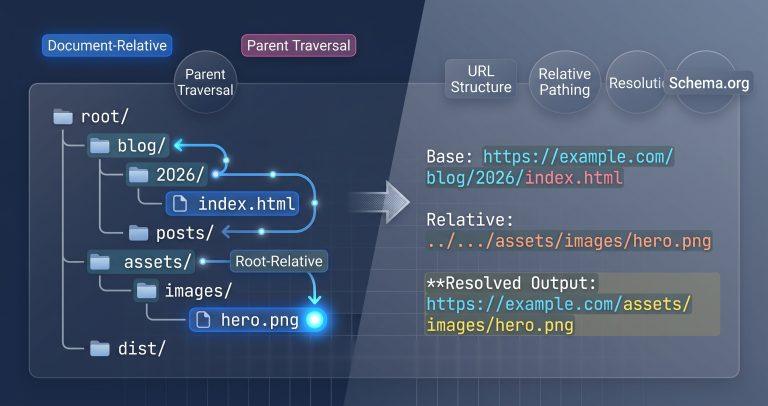
Relative paths break more often than developers expect. 80% of front-end bugs trace back to incorrect asset paths when moving files between directories. This tool resolves any relative URL against a base URL, visualizes the directory traversal steps, and shows you exactly where your paths land.
Why This Tool Exists
Most URL resolvers give you plain text output and stop there. They don’t show you the directory structure, the dot‑segment normalization steps, or the trailing slash impact that changes everything. Competitors like relativetoabsolute.com require a click to convert and offer zero visual context. MDN’s documentation explains the theory but provides no interactive playground.
This tool fills the gap by combining WHATWG‑standard URL resolution with a visual file tree, step‑by‑step normalization tracking, and a <base> tag simulator – all in one interface.
How This Tool Works
The tool uses your browser’s native new URL(relative, base) constructor, following the exact WHATWG URL Living Standard resolution algorithm. It parses the base URL, tokenizes the relative path into segments, and resolves each ./, ../, and / step in order.
- Base URL Parsing – Splits the base into scheme, host, port, path, query, and fragment components using the built‑in
URLAPI. - Relative Path Tokenization – Breaks your relative path into individual segments, identifying dot segments (
.and..), root‑relative paths (/), and file names. - Directory Tree Rendering – Builds an interactive folder tree showing the web root, current directory, parent traversals, and final target path.
- Normalization Stepper – Displays each dot‑segment elimination step in sequence, showing how
../../assets/../images/./hero.pngcollapses to a clean path. - Trailing Slash Impact – Toggles between base URLs with and without trailing slashes, showing how
/blog/2026vs/blog/2026/changes the resolved target.
Real‑World Use Cases
- Asset Path Debugging: When images break after restructuring your site, paste the page URL and the image src into the tool. The visual tree immediately shows if
../went one level too high or too low. - CMS Content Migration: Moving blog posts from
/blog/2024/to/posts/2026/often breaks relative links. Preview the new absolute URLs before updating your database, catching broken links before deployment. - Documentation Site Builds: When building static sites with multiple output folders, use the tool to verify that cross‑referenced documentation links resolve correctly across directory levels.
A lead engineer at an e‑commerce platform used this tool to debug a 300‑item asset migration. The trailing slash disambiguator revealed that 15% of image paths resolved to the wrong folder because the base URL lacked a trailing slash – a bug that would have taken hours to trace manually.
Common Pitfalls & How to Avoid Them
- Problem: A relative image path works locally but breaks in production. Solution: The tool shows you the exact resolved absolute URL. Compare it against your actual file structure. Often, the base URL in production has a different path depth than your local environment.
- Problem: Your base URL lacks a trailing slash (
/blog/2026), and./image.pngresolves to/blog/image.pnginstead of/blog/2026/image.png. Solution: Always include the trailing slash for directory‑style base URLs. The tool’s side‑by‑side toggle makes this behavior immediately visible. - Problem: A relative path uses
../../../and escapes the web root, resulting in a broken URL. Solution: The tool normalizes excessive parent traversals per the WHATWG spec, stripping segments that would go above the root. You’ll see exactly where the path lands without cryptic errors.
Troubleshooting & Error Handling
- Invalid Base URL: If you type
example.comwithout thehttps://scheme, the tool shows a validation error and prompts you to include the full protocol. TheURLconstructor requires a valid absolute URL as the base. - Encoding Issues: Spaces in paths are automatically encoded to
%20. If you see unexpected%characters, the tool preserves the encoding and displays the decoded version alongside for clarity. - Protocol‑Relative URLs: When resolving
//cdn.example.com/lib.jsagainsthttp://site.com, the tool preserves the base protocol. Critical Warning: This can cause mixed‑content warnings on HTTPS pages.
FAQ
How does a browser resolve relative paths against a base URL?
The browser uses the WHATWG URL resolution algorithm. It parses the base URL into components, then applies the relative path token by token. Dot segments (. and ..) are normalized, and the final absolute URL is constructed.
What is the difference between root‑relative (/image.png) and document‑relative (./image.png) paths?
Root‑relative paths start from the web root directory, regardless of the current document location. Document‑relative paths resolve from the current directory of the document. Use root‑relative for global assets like CSS and document‑relative for page‑specific resources.
Why do relative image paths break when a base URL lacks a trailing slash?
Without a trailing slash, the browser treats the last path segment as a file name, not a directory. So ./image.png resolves to the same directory level, missing the intended subfolder. Add the trailing slash to tell the browser it’s a directory.
How does the HTML <base> tag alter relative URL resolution behavior?
The <base> tag overrides the current document’s URL as the resolution base for all relative paths in the document. All href, src, and action attributes resolve against this new base. The tool’s sandbox toggles this behavior so you can preview the impact.
What happens when a relative path uses too many parent directory (../) segments?
The WHATWG specification normalizes excessive .. segments by stopping at the root. So ../../../../file.txt from /a/b/c/ resolves to /file.txt, not a broken path. The tool visualizes this normalization in the step‑by‑step panel.
Can I test <img src> and <a href> behavior with different base URLs?
Yes. The HTML tag sandbox lets you set a <base href> and render sample <img> and <a> tags below it. You see exactly how each relative asset resolves in a simulated DOM environment.
How do I get code for resolution in different programming languages?
The tool exports ready‑to‑paste code snippets for JavaScript (new URL()), Python (urllib.parse.urljoin), Node.js (path.resolve), and PHP (http_build_url). Copy the snippet directly from the export panel.