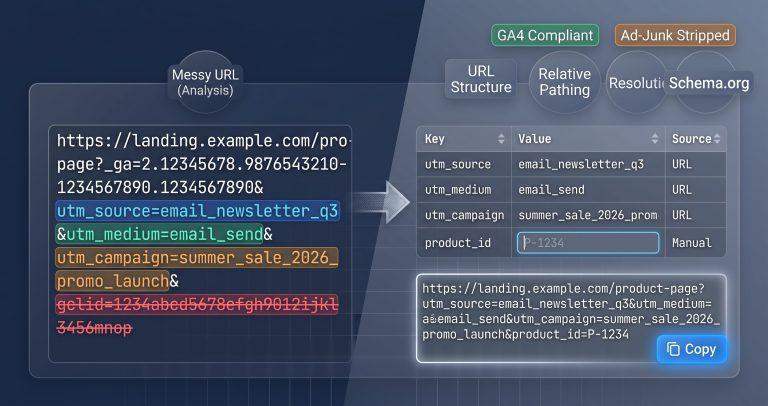
A single mistyped UTM parameter can fragment your analytics data. 47% of marketing campaigns suffer from attribution errors due to inconsistent casing, missing parameters, or tracking junk cluttering the URL. This tool parses any UTM‑tagged link, displays every parameter in an editable table, and lets you rebuild, clean, or normalize the URL instantly.
Why This Tool Exists
Most UTM parsers are read‑only. They show you what’s in the URL but force you to re‑paste or re‑build the link if you want to change anything. Competitors like blinkurls.com give static text output. UTMchecker.com drowns you in ads and offers no editing. Cleanor.app separates parsing and cleaning into different tools, wasting your time.
This tool solves the problem by combining parsing, editing, normalization, and ad‑junk stripping into one live interface. Change any parameter value, and the output URL updates in real time. Spot inconsistent casing? One click normalizes everything to lowercase, preventing GA4 from splitting Google_Ads, google_ads, and Google_ads into three separate traffic sources.
How This Tool Works
The dissector uses your browser’s native URLSearchParams API to parse and manipulate query strings. It extracts every parameter, categorizes them, and renders them in an editable table that drives the live URL rebuild.
- URL Parsing – Passes your input through
new URL()to extract the base path, search parameters, and hash fragment. - Parameter Categorization – Automatically labels each key as standard UTM (
utm_source,utm_medium,utm_campaign,utm_term,utm_content), GA4 extended (utm_id,utm_source_platform), or ad‑junk (gclid,fbclid,msclkid). - Live Editable Table – Every parameter appears as an editable row. Change any key or value, and the output URL rebuilds instantly.
- Case Normalization – One button converts all
utm_*parameter values to lowercase, preventing fragmented attribution data in GA4. - Ad‑Junk Stripping – Isolates platform‑injected click IDs into a separate group and removes them with a single click.
Real‑World Use Cases
- Campaign Audit: Review all active marketing links before launching a new quarter. The GA4 compliance auditor flags missing
utm_sourceorutm_mediumparameters and highlights uppercase values that will fragment your data. - Link Cleanup for Customer Support: A customer shares a broken tracking link from an email campaign. Strip the
gclidandfbclidjunk, clean the URL, and share a working link back to them in seconds. - Migration to GA4: Your team is moving from Universal Analytics to GA4. The tool’s extended parameter validator checks for modern GA4 keys (
utm_id,utm_source_platform) and warns you when they’re missing, ensuring a smooth transition.
A digital marketing manager at a B2B SaaS company used this tool to audit 150 active campaign URLs. The lowercase normalizer caught 40+ instances of mixed‑case utm_source values, which would have fragmented their Google Ads attribution reports. After normalization, their GA4 data became consistent across all channels.
Common Pitfalls & How to Avoid Them
- Problem: UTM parameters are case‑sensitive in GA4.
Source=Googleandsource=Googleare treated as separate traffic sources. Solution: Always use lowercase forutm_source,utm_medium, andutm_campaignvalues. The tool’s one‑click normalizer fixes this instantly. - Problem: Your URL contains duplicate parameters (e.g.,
utm_source=google&utm_source=facebook), breaking analytics attribution. Solution: The tool’s table highlights duplicate keys in red. Remove or edit the duplicates directly in the table, and the rebuilt URL automatically corrects the issue. - Problem: Platform auto‑tagging junk (
gclid,fbclid,ttclid) clutters your link and breaks when copied internally. Solution: The “Strip Ad IDs” button removes all non‑UTM click identifiers in one action, leaving only your intentional campaign parameters.
Troubleshooting & Error Handling
- Missing Protocol: If you paste
example.com/page?utm_source=googlewithouthttps://, the tool automatically prependshttps://to avoid a parse error. The base URL is displayed with the corrected protocol. - Percent‑Encoded Characters: Values containing
%20(space) or%2F(slash) are decoded in the table for readability. When you rebuild the URL, the tool re‑encodes them correctly without double‑encoding. - Unencoded Ampersands: If a parameter value contains an unencoded
&(e.g.,utm_content=Contact&Support), the parser treats it as a new parameter. The tool detects this and warns you to encode the ampersand as%26.
Critical Warning: Never paste sensitive customer identifiers or PII into any UTM parameter. While this tool processes everything client‑side, best practice is to avoid including personal data in campaign URLs entirely.
FAQ
Are UTM parameter values case‑sensitive in Google Analytics 4?
Yes. GA4 treats Google, google, and GOOGLE as separate traffic sources. Always use consistent casing – typically lowercase – to prevent data fragmentation. The tool’s normalizer converts all values to lowercase in one click.
How do I remove tracking query parameters like gclid and fbclid from a URL?
These are ad‑junk click IDs injected by Google Ads and Meta. The tool categorizes them separately. Click the “Strip Ad IDs” button to remove all non‑UTM tracking parameters instantly.
What are the new GA4 campaign parameters besides the standard 5 UTM tags?
GA4 supports extended parameters including utm_id (campaign ID), utm_source_platform (source platform), utm_creative_format (ad format), and utm_marketing_tactic (marketing tactic). The tool’s compliance auditor checks for these modern keys.
What is the difference between a UTM builder and a UTM parser?
A builder creates new UTM links from scratch. A parser takes an existing tracking link and breaks it down into readable components. This tool is a parser with editing capabilities – it dissects what you already have and lets you modify it.
How does improper URL encoding break Google Analytics campaign tracking?
Unencoded special characters like &, ?, and # can truncate parameters or break the entire query string. The tool decodes values for readability and re‑encodes them properly when rebuilding the URL, ensuring your tracking works correctly.
Can I export the parsed parameters as a clean list?
Yes. The table provides a complete view of all extracted parameters. You can copy the values directly or use the rebuilt URL with your modifications applied.
What happens if I edit a parameter key or value in the table?
The output URL rebuilds in real time. Change utm_source=Google to utm_source=facebook, and the updated link appears immediately below the table. Use it directly or copy it with one click.