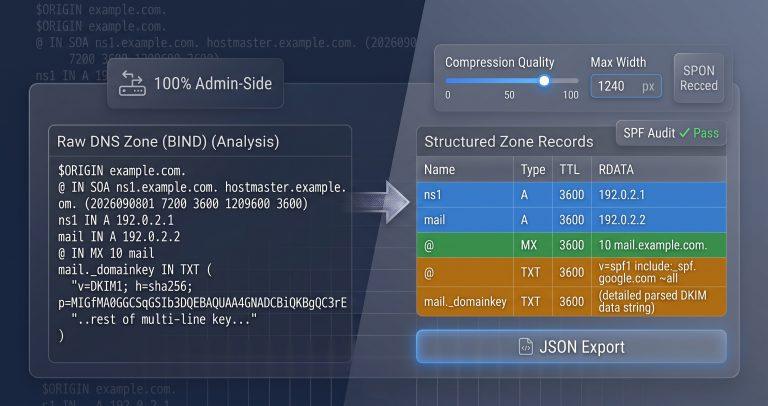
DNS zone files are notoriously difficult to read raw. Over 40% of email delivery issues trace back to misconfigured SPF or DKIM records hidden inside messy TXT strings. This tool parses any DNS text dump – BIND zone files, dig command output, or cPanel exports – and organizes every record into a clean, filterable table with email authentication auditing built in.
Why This Tool Exists
Most DNS tools require a live domain to query. MxToolbox and DNSDumpster actively scan the internet – they can’t parse a text blob you copied from Cloudflare or a BIND backup. EasyZoneFile is a builder, not a parser. None of them handle multi‑line TXT records wrapped in parentheses or expand $ORIGIN directives correctly.
This tool fills the gap by accepting raw text dumps and applying BIND master file parsing logic entirely in your browser. It reassembles multi‑line DKIM strings, resolves @ placeholders against $ORIGIN, and even audits your SPF and DMARC records for security risks.
How This Tool Works
The parser uses a multi‑pass tokenization engine designed for the BIND master file format defined in RFC 1035. It strips comments, collapses parentheses, tracks control directives, and extracts every resource record.
- Parenthesis Collapsing – Identifies multi‑line values wrapped in
( )and reassembles them into continuous strings. This is essential for SOA records, long DKIM keys, and split TXT entries. - Directive Tracking – Reads
$ORIGINand$TTLdirectives to expand relative names. The@symbol becomes the active origin domain, and relative hostnames become fully qualified. - Record Extraction – Splits each line into name, TTL, class, type, and RDATA columns. Handles missing
INclass definitions and inline comments starting with;. - SPF/DMARC Auditing – Detects TXT records that start with
v=spf1orv=DMARC1and breaks them into token‑by‑token components with security warnings. - Filterable Grid – Displays parsed records in a sortable table with quick‑filter buttons for A, MX, CNAME, TXT, and SOA record types.
Real‑World Use Cases
- DKIM Key Verification: Copy your public DKIM record from your email provider’s portal. The parser reassembles the multi‑line
( )wrapped string and displays the full key for manual verification against your DNS hosting panel. - SPF Policy Audit: Paste your SPF TXT record into the parser. The SPF tokenizer highlights
include:mechanisms,ip4:ranges, and the final~allor-allpolicy. It flags duplicatev=spf1declarations and missingp=rejectpolicies in DMARC records. - Zone File Migration: Export your BIND zone file from one hosting provider and paste it into the parser before importing to another. The JSON export gives you a clean, structured representation that you can validate before the actual import.
A system administrator at a SaaS company used this tool to debug a DMARC failure that was causing 15% of their emails to be marked as spam. The parser’s SPF auditor flagged an extra v=spf1 record hidden inside a concatenated TXT string – a mistake that had been invisible in their DNS hosting panel’s text editor.
Common Pitfalls & How to Avoid Them
- Problem: Your DKIM record shows as a single line of text, but the DNS provider requires multiple lines. Solution: The parser’s parenthesis collapser reassembles the full key. Use the displayed string to copy the complete value, then split it with line breaks when pasting into your DNS hosting UI.
- Problem: Your SPF record includes multiple
v=spf1declarations, causing validation to fail. Solution: The parser flags duplicatev=spf1tokens. Only one SPF record per domain is allowed. Consolidate all mechanisms into a single TXT record. - Problem: Relative hostnames like
wwwin your zone file resolve to unexpected domains. Solution: The parser tracks$ORIGINand expands relative names. If the output shows unexpected FQDNs, check your$ORIGINdirective and ensure it matches your intended domain.
Troubleshooting & Error Handling
- Unrecognized Lines: Lines that don’t match known record patterns are flagged as “Unrecognized Syntax.” The parser highlights them in red so you can manually inspect them. Often, these are comments or malformed entries.
- Missing
$ORIGIN: If no$ORIGINis defined, the parser uses a default origin of.(the root). Relative names may not resolve correctly – add an$ORIGINdirective to your zone file or use fully qualified names throughout. - Escaped Semicolons: Semicolons inside quotes are preserved. Semicolons outside quotes are treated as comments and stripped. The parser handles this correctly, so quoted values remain intact.
Critical Warning: Never paste sensitive DNSSEC private keys or authentication tokens into this tool. While everything runs client‑side, best practice is to avoid exposing cryptographic material in any tool, even local ones.
FAQ
How do I read and parse a raw BIND DNS zone file format?
A BIND zone file is a text file containing directives ($ORIGIN, $TTL) and resource records. The tool tokenizes the file, expands relative names against $ORIGIN, and displays each record in a structured table with type and RDATA columns.
What does the @ symbol mean in a raw DNS zone text file?
The @ symbol represents the current origin domain, which is set by the $ORIGIN directive. If no $ORIGIN is set, it defaults to the zone name specified in the SOA record. The parser expands @ to the active FQDN during processing.
How do I fix multi‑line DKIM TXT records wrapped in parentheses?
The parser automatically collapses parenthesized multi‑line strings into a single continuous value. Copy the reassembled string from the output table – it’s the complete DKIM key ready for pasting into your DNS provider’s text field.
How can I parse the command line text output of a dig any command?
Paste the full terminal output into the parser. The tool strips query metadata (;; ANSWER SECTION:, ;; Query time:) and extracts only the resource records, displaying them in the filterable grid.
Why is my SPF text record failing syntax validation?
Common SPF syntax errors include duplicate v=spf1 declarations, missing ~all or -all at the end, and invalid mechanisms. The parser’s SPF auditor highlights these issues and provides inline warnings to help you fix them.
What is the difference between a zone file parser and a live DNS lookup tool?
A live tool queries the actual DNS hierarchy over the network. A zone file parser works offline with any text blob – it can read exports, backups, or manual copies without needing a live domain.
How do I export the parsed records for use in automation?
Click the JSON export button. The tool outputs a structured JSON array containing all records with their name, type, TTL, and RDATA. Use this for scripting or integration with provisioning tools.