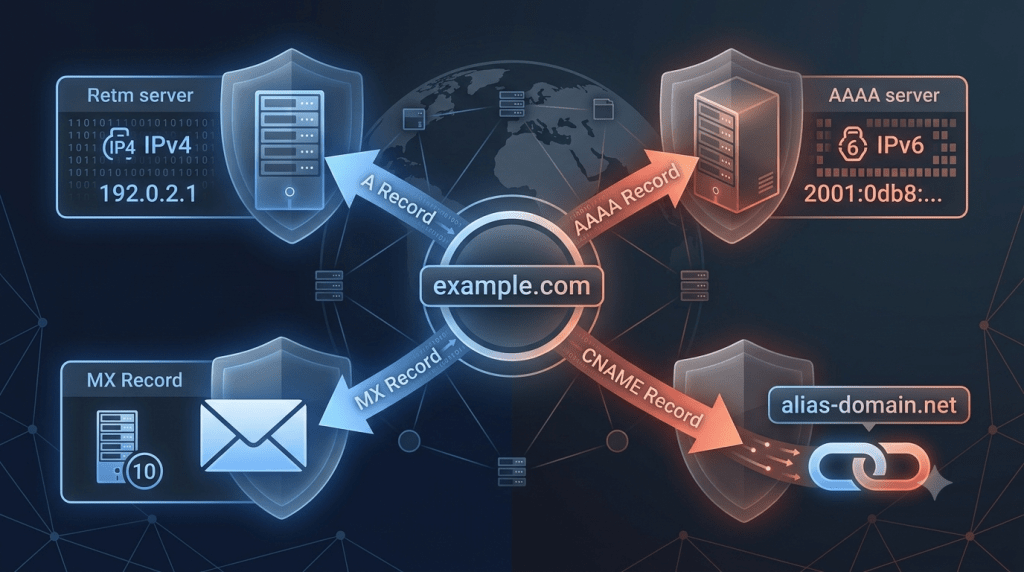
DNS Records Explained: A, CNAME, MX, and What They Do
DNS records explained simply: they’re instructions stored in a zone file, a configuration file on an authoritative DNS server, telling the internet where a domain’s traffic, email, and services should go. Most guides list the record types and stop there. The part that actually trips up administrators is the constraints between them, like why a CNAME record can never point to an MX record, a rule buried in RFC standards that causes real configuration failures.
What Are DNS Records
A DNS record is a single instruction inside a zone file on an authoritative nameserver, the server responsible for holding the official records for a domain. Each record type serves a distinct purpose, and a domain typically needs several working together, not just one.
A and AAAA Records: Address Records
A Records Point to IPv4 Addresses
An A record maps a domain name directly to an IPv4 address, the numeric address format like 192.0.2.1 that identifies a server. This is the most fundamental record type, since it’s what lets a browser turn a typed domain name into an actual server location.
AAAA Records Point to IPv6 Addresses
An AAAA record does the same job as an A record but maps to an IPv6 address instead, the newer, longer address format built to handle the internet running out of IPv4 addresses. AAAA records are increasingly required as more networks, especially mobile carriers, prioritize IPv6 by default.
CNAME Records: Canonical Name Aliases
A CNAME record aliases one domain name to another domain name, rather than to an IP address directly. This makes CNAME records useful for subdomains and CDNs, content delivery networks that serve site assets from a domain the CDN provider controls, since the CDN can change its underlying IP addresses without you having to update your DNS.
The Root Domain Limitation
Most DNS providers prohibit placing a CNAME record on the root domain, meaning the naked domain like example.com without any subdomain prefix. This exists because the root domain typically also needs other records, like MX and TXT, and DNS standards don’t allow a domain to have a CNAME alongside other record types at the same name. The practical workaround is using an A record on the root domain instead, or a provider-specific alias record that behaves like a CNAME while bypassing this restriction.
Why a CNAME Cannot Point to an MX Record
This is the constraint most beginner guides skip entirely. Standards explicitly forbid an MX record from pointing to a domain that itself is a CNAME. The mail server’s domain must resolve directly to an A or AAAA record. If you point MX at a CNAME target, mail delivery can fail or behave unpredictably, because mail servers performing the lookup expect a direct address resolution, not another alias to follow.
MX Records: Mail Exchange
An MX record directs email addressed to your domain toward a specific mail server. Any domain that needs to receive email needs at least one MX record, and as covered above, that record must point to an A or AAAA record, never to a CNAME.
NS, SOA, and TXT Records
NS Records: Nameserver Delegation
An NS record specifies which nameservers are authoritative for a domain, meaning which servers hold the official, trusted copy of that domain’s DNS records.
SOA Records: Zone Administration
An SOA record, or Start of Authority record, stores administrative information about a DNS zone, including which nameserver is primary and how often secondary servers should check for updates.
TXT Records: Verification and Email Authentication
A TXT record stores arbitrary text, most commonly used today for email authentication standards like SPF, DKIM, and DMARC, which help receiving mail servers verify that an email claiming to be from your domain is legitimate and not spoofed.
DNS Record Mastery: Comparing the Core Types
| Record Type | Primary Purpose | Critical Constraint | Common Gotcha |
|---|---|---|---|
| A | Points domain to an IPv4 address | Must point directly to an IP | Can coexist with an MX record on the root domain |
| AAAA | Points domain to an IPv6 address | Must point directly to an IPv6 address | Increasingly required for mobile network compatibility |
| CNAME | Aliases one domain to another domain | Cannot be placed on the root domain | Cannot be the target of an MX record |
| MX | Directs incoming email to a mail server | Must point to an A or AAAA record | Pointing it to a CNAME can break mail delivery |
How DNS Resolution Works: The Journey From Browser to IP Address
The Cache Checks Come First
Before any network request happens, your browser checks its own application cache for a recently resolved copy of the domain. If nothing is found there, your operating system checks its own separate DNS cache next.
The Recursive Resolver Takes Over
If neither cache has an answer, the request goes to a recursive resolver, the server, often run by your ISP or a public provider, that does the actual work of tracking down the answer on your behalf. The recursive resolver is the unsung part of this process most guides skim past, since it doesn’t just make one request. It queries a root nameserver first, then a TLD nameserver, the server responsible for a top-level domain like .com or .org, and finally the authoritative nameserver for the specific domain, before it can return an answer.
The Scale Behind Root Servers
The root nameserver layer isn’t a single server. It runs as 13 root server clusters, distributed globally through anycast routing, a network technique that routes a query to the nearest available server instance rather than one fixed location, across nearly two thousand server instances worldwide. This distributed design is what lets root-level DNS queries handle global traffic without a single point of failure.
TTL and Propagation: What’s Actually Happening
TTL, or time to live, is a value on each DNS record that tells resolvers how long to cache that answer before checking again. Setting TTL too low means resolvers query your nameservers far more frequently, increasing load. Setting it too high means any change you make, like updating an A record after migrating servers, takes longer to reach users worldwide, since cached copies keep being served until they expire. A common practical approach is lowering TTL temporarily before a planned change, then raising it again once the change has fully propagated.
FAQ
Can I use a CNAME record on my root domain?
Most providers don’t allow it, since the root domain typically needs to coexist with other record types like MX and TXT, which standard CNAME rules don’t permit. An A record is the typical workaround.
Why did my email stop working after I set up a CNAME?
If your MX record points to a domain that is itself a CNAME, mail delivery can fail, since MX records are required to resolve directly to an A or AAAA record.
How long does a DNS change take to go live everywhere?
It depends on the TTL set on the record before the change. Lower TTL values propagate faster, often within minutes, while higher TTL values can take hours since cached copies remain valid until they expire.



