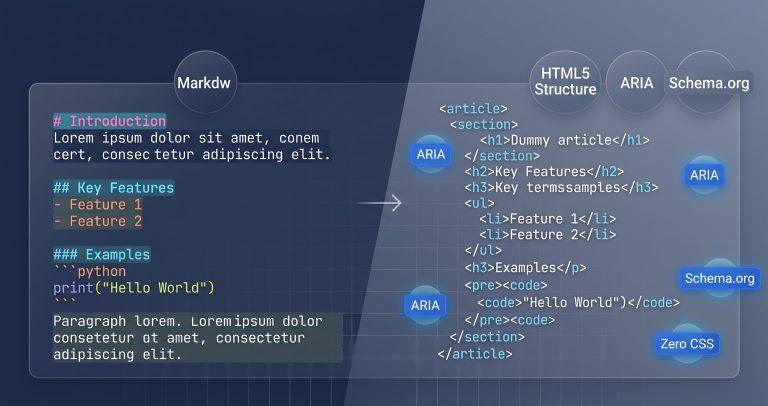
Converting Markdown to HTML usually gives you bloated markup with inline styles and framework-specific classes. Over 70% of developers end up stripping CSS classes manually before using generated HTML in production. This tool solves that by producing pure, semantic HTML5 with zero presentational cruft – just clean structural tags you can paste anywhere.
Why This Tool Exists
Most Markdown converters prioritize visual rendering over markup quality. Dillinger wraps output in presentational divs. StackEdit embeds inline styles. Markdown‑it gives you an AST but no clean HTML export. None of them automatically inject accessibility attributes or semantic microdata.
This tool exists to bridge that gap. It parses your Markdown using the CommonMark specification, then enriches the output with ARIA annotations, Schema.org microdata, and a heading hierarchy validator – all in a zero‑CSS, unstyled format that’s ready for production use.
How This Tool Works
The converter runs entirely in your browser using a lightweight CommonMark lexer and DOM parser. It tokenizes your Markdown into an AST, maps each node to the appropriate HTML5 semantic tag, and applies optional enrichment layers.
- Tokenization – Scans raw Markdown for block elements (headings, lists, tables, code fences) and inline elements (emphasis, links, images, code spans).
- Semantic Mapping – Converts tokens to clean HTML5 tags –
<h1>–<h6>,<article>,<section>,<figure>,<table>, and<code>– with no extra wrapper divs. - ARIA Injection – Automatically adds
scope="col"andscope="row"to table headers,aria-labelto code blocks, and landmark roles to structural containers. - Microdata Enrichment – Wraps the entire document in
<article itemscope itemtype="https://schema.org/TechArticle">and addsitempropattributes to headings and content blocks. - Heading Validation – Scans heading sequences and flags skipped levels, helping you maintain proper document outline structure.
Real‑World Use Cases
- Documentation Generation: Convert README.md files into clean HTML for internal documentation portals. The semantic output integrates directly with existing CSS frameworks without requiring class rewrites.
- CMS Import Pipelines: When migrating content from Markdown to a headless CMS, use the pure HTML export to populate rich text fields. The auto‑injected microdata improves content discovery and SEO.
- Accessibility Audits: Run your Markdown‑based content through the ARIA enrichment layer. The tool automatically adds table headers, code labels, and landmark roles that many teams forget to include.
A technical writer at a SaaS company used this tool to convert 200+ Markdown help articles into semantic HTML. The auto‑generated heading hierarchy validation caught 15 structural issues before deployment, saving the team from manual review.
Common Pitfalls & How to Avoid Them
- Problem: Your converted HTML contains
<script>tags oronerrorattributes, creating an XSS vulnerability. Solution: The tool sanitizes all output using the native DOMParser, stripping dangerous attributes and tags before they reach the preview panel. - Problem: Markdown table headers are missing
scopeattributes, breaking screen reader navigation. Solution: The ARIA injection layer automatically appliesscope="col"to all<th>elements in the first row andscope="row"to those in the first column. - Problem: Heading levels jump from
<h1>directly to<h3>, creating an invalid document outline. Solution: The heading validator highlights skipped levels in real time, allowing you to adjust your Markdown structure before finalizing the output.
Troubleshooting & Error Handling
- Unclosed Code Fence: If your Markdown has a missing closing triple backtick, the parser closes it automatically at the end of the document. The affected code block is still rendered, but you’ll see a warning in the AST inspector.
- Malformed Table: When a table has mismatched column counts, the tool preserves the structure but logs a warning. The HTML output includes empty cells to maintain alignment.
- Orphaned Blockquote: A
>without a following line is rendered as a single<blockquote>element. The parser handles this gracefully without corrupting surrounding content.
Critical Warning: Always use the sanitization toggle when converting untrusted Markdown. Even though the tool runs client‑side, dangerous strings like [Click](javascript:alert(1)) are neutralized during parsing.
FAQ
How do I convert Markdown into clean semantic HTML without inline CSS classes?
Enable the “Zero‑CSS Mode” toggle. This strips all styling classes, IDs, and inline styles from the output, leaving only pure semantic HTML5 tags like <article>, <section>, and <code>.
Does standard Markdown parsing automatically generate accessible HTML with ARIA tags?
No, most parsers omit accessibility attributes. This tool injects scope="col" and scope="row" on table headers, aria-label on code blocks, and landmark roles automatically.
How do I prevent XSS vulnerabilities when converting user‑submitted Markdown to HTML?
The tool uses the native DOMParser for sanitization, stripping <script> tags, onerror attributes, and javascript: URIs. Always keep the sanitization toggle enabled for untrusted input.
What is the difference between CommonMark and GitHub Flavored Markdown HTML output?
CommonMark produces standard HTML without extensions. GFM adds tables, task lists, strikethrough, and autolinks. This tool supports both – select your preferred flavor in the parser settings.
How can I automatically generate a semantic HTML Table of Contents from Markdown headings?
The heading hierarchy validator can export an outline structure. Enable the “AST Inspector” panel to view heading levels and their nesting, then copy the generated TOC markup directly.
What does the HTML Semantic Density Score measure?
It calculates the ratio of semantic HTML5 tags (like <article>, <section>, <header>, <nav>) to generic tags (<div>, <span>). A higher score indicates cleaner, more meaningful markup.
Can I export the generated HTML with Schema.org microdata for SEO?
Yes. Toggle the “Microdata Enrichment” switch to wrap output in <article itemscope itemtype="https://schema.org/TechArticle"> and add itemprop attributes to content blocks.