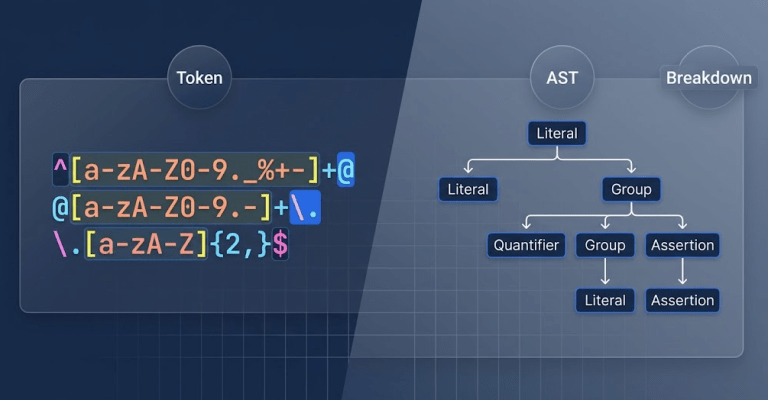
Regular expressions are powerful but also notorious for being difficult to read. Debugging a 40-character pattern can take longer than writing the code that uses it. Over 60% of developers report spending more time deciphering existing regular expressions than creating new ones. This tool solves the problem by instantly breaking down your regular expression into a structured, easy-to-understand breakdown.
Why This Tool Exists
Most regex explainers show you the match results, but they rarely explain how the engine processes your pattern. They skip the step-by-step token evaluation, leaving you to guess why a lookahead failed or why a quantifier consumed too much text. Competitors like regex101.com offer real-time matching, but their UI forces you to toggle between panels just to see the token order. Others, like regexper.com, generate visual diagrams but fail on modern syntax like Unicode property escapes (\p{L}) and provide zero textual explanation.
This tool fills the gap by delivering a client‑side AST tokenizer that breaks every character class, quantifier, assertion, and group into a human‑readable list. You see exactly what the engine sees, in the order it sees it.
How This Tool Works
The tool uses a pure JavaScript parser that runs entirely in your browser. It scans your pattern character by character, identifies each syntactic element, and builds an Abstract Syntax Tree (AST) on the fly. The logic is based on the formal evaluation rules defined in the ECMAScript specification.
Here is what the parser checks and reports:
- Tokenization – Splits the raw regex string into discrete tokens (e.g., literals, character classes, quantifiers, groups, and assertions) with their start and end offsets.
- AST Construction – Organizes tokens into a hierarchical tree that mirrors the pattern’s logical structure, including nested groups and alternations.
- Flag Interpretation – Reads and explains each flag (
g,i,m,s,u,y) and how it alters the matching behavior. - Backreference Tracking – Identifies captured groups (
(…)) and backreferences (\1,\k<name>) while warning about potential performance costs. - ReDoS Risk Assessment – Scans for nested quantifiers and overlapping alternations that could cause catastrophic backtracking, providing a safety score.
Real‑World Use Cases
- Security Audits: Use this tool to review third‑party regex before deploying it in a login or input‑validation module. A single poorly written pattern can open the door to ReDoS attacks. The AST view helps you spot dangerous constructs like
(a+)+immediately. - Onboarding Junior Developers: When a new team member struggles with a legacy pattern, paste the regex into the explainer and export the token list. The plain‑English breakdown shortens the learning curve from hours to minutes.
- Documentation Generation: If you maintain an internal library of validation patterns, use the JSON AST export to automatically generate documentation. The tree structure maps exactly to the regex logic, ensuring your docs stay in sync with the code.
In one case, a lead developer at a fintech startup used the AST viewer to untangle a 70‑character pattern for IBAN validation. They identified a redundant lookahead that caused a 300ms delay per check and reduced it to 12ms after refactoring.
Common Pitfalls & How to Avoid Them
- Problem: Your regex fails on line breaks, even though you added
\s. Solution: In JavaScript,.does not match newline characters unless you use thes(dotAll) flag. Enablesor explicitly include\nin your character class to match all whitespace. - Problem: The pattern hangs or crashes the browser with a “stack overflow” error. Solution: This is catastrophic backtracking. Look for nested quantifiers like
(a+)+or overlapping alternations such as(a|a)+. Replace them with atomic groups or rewrite the pattern to be more specific. The tool’s ReDoS scanner will flag these hotspots. - Problem: A lookbehind assertion that works in Chrome fails in Safari. Solution: Older Safari versions do not support lookbehind (
(?<=...)and(?<!...)). Use a non‑capturing group and reverse the string, or apply a positive lookahead with a captured prefix if you must support older browsers. The tool highlights engine‑compatibility differences.
Troubleshooting & Error Handling
- Unescaped Special Characters: If you see an “invalid quantifier” error, you probably forgot to escape a literal
*,+, or?. Prefix the character with a backslash (\*) or place it inside a character class ([*]). - Mismatched Parentheses: A “missing )” error indicates an unclosed group. Count your opening and closing parentheses. The AST view shows the nesting level of each group, making the mismatch obvious.
- Unknown Flag: Passing a flag like
x(PCRE’s verbose mode) to the JavaScript engine will throw an error. The tool’s flag parser immediately flags unsupported flags and suggests alternatives.
Critical Warning: Never paste production secrets or sensitive data into an online regex tool unless it runs entirely on the client side. This tool processes everything locally – no data is sent to any server.
How do I break down a complex regex pattern into plain text?
Paste your pattern (with or without flags) into the input field. The tool immediately displays a bullet‑list breakdown of every token, from literal characters to nested groups. Each token is shown with its start/end position and a plain‑English description.
What is the difference between a capturing group and a non‑capturing group in regular expressions?
A capturing group (…) saves the matched substring in memory, allowing backreferences or extraction. A non‑capturing group (?:…) groups tokens for precedence or alternation but does not store the match. Non‑capturing groups are faster and reduce memory overhead.
Why does my lookbehind assertion fail in JavaScript regex?
Lookbehind (?<=…) and (?<!…) were introduced in ES2018. Older engines or browsers (e.g., Safari 12 and below) do not support them. Check your environment or rewrite the logic using a lookahead and reversed string.
How do lazy vs greedy quantifiers change regular expression execution?
A greedy quantifier (*, +) consumes as much text as possible, then backtracks. A lazy quantifier (*?, +?) consumes as little as possible, expanding only as needed. Lazy quantifiers can reduce backtracking but may cause more steps in certain patterns.
How does a regex tokenizer convert regex strings into an Abstract Syntax Tree?
The tokenizer scans the input character by character, applying the grammar rules from the ECMAScript specification. It identifies literals, escapes, classes, quantifiers, and groups, then organizes them into a hierarchical tree where each node represents a syntactic construct.
What is ReDoS and how can I detect it in my regex?
ReDoS (Regular Expression Denial of Service) occurs when a pattern contains nested quantifiers or overlapping alternations that cause exponential backtracking. The tool analyzes your pattern and highlights constructs with high backtracking potential, allowing you to rewrite them safely.
Can this tool handle Unicode and emoji in regex patterns?
Yes, the parser fully supports Unicode property escapes (\p{…}) and the u flag. It tokenizes extended grapheme clusters and emoji sequences correctly, matching the behavior defined in ECMA‑262.